The European Commission is moving to a new corporate financial system designed to modernize, harmonize, and standardize the EU's financial business processes. This new system aims to enhance transparency, ensure compliance with anti-money laundering regulations, and improve the implementation of GDPR rules. A key principle is that all recipients of EU payments must be clearly identified.
Banking and legal information for experts are now categorized under a new concept called Business Partners.
a) Experts representing the government of a State/Country/Region:
As a preferred option, expenses of governmental experts will be reimbursed to a bank account belonging to the governmental organization they represent (e.g., State/Ministry/Country/Region). Each of these entities need to be registered as a Business Partner in the European Commission (EC) accounting system. To follow this option, you will need to search for the governmental organization experts represent in the system and add the entity's (e.g., Ministry) bank account to its Business Partner if it does not already exist.
Please note that all member states, ministries of member states, and most known governmental organizations are already registered in our new financial system. In case the organization experts represent is not yet registered, this can be done via AGM.
Expense reimbursements to a personal bank account are only possible if the expert provide a derogation from their member state. If a derogation is provided, the governmental expert will be paid directly to their personal bank account. In such cases, however, the expert must be registered as a Business Partner in the Private Person category within the EC accounting system. This registration requires the submission of ID documents along with their bank account details.
b) Experts representing an entity of private or public law:
If an expert represents an entity of private or public law, expenses will be reimbursed to a bank account belonging to the entity they represent. These entities must be registered as Business Partners in the European Commission (EC) accounting system. To follow this option, you will need to search for the public or private organization the expert represents in the system and add the entity's bank account to its Business Partner profile if it does not already exist.
Most known public or private organization are already registered in our new financial system. In case the organization experts represent is not yet registered as a Business Partner, this can be done via AGM.
Reimbursement to a different bank account is only possible if the expert provides a derogation from their private company or public institution. As with governmental experts, if a derogation exists, the expert must be registered as a Private Person and need to provide identification documents.
c) Experts invited in their private capacity:
Reimbursements of expenses for experts invited in their private capacity will be paid exclusively to the expert's bank account. Exceptions will only be considered in very exceptional circumstances and the request must be clearly justified. The expert must be registered as a Business Partner in the Private Person category within the EC accounting system. This registration requires the submission of ID documents along with their bank account details.
Banking and legal information
All requests for validation of a bank account must be accompanied by the following supporting documents:
- The financial identification form duly completed and signed by the account holder.
If you indicate that you’re the account holder, the form is signed electronically. If you indicate that you’re not the account holder, complete the form, download it, get the account holder to sign it and upload the scanned version. Follow the instructions in our guide.
- A recent document (less than 6 months) issued by the bank (such as a bank statement, customer identification document, bank certificate, internet banking screenshots), indicating the name of the bank, name of the account and the account number/IBAN (if applicable).
If such a document is not available, a bank stamp (indicating the name of the bank) and the signature of a bank official may be accepted on the financial identification form.
Banking and legal information
All requests for natural persons must be accompanied by the following supporting documents:
- The legal entity form for a natural person duly completed, dated and signed by the person invited (expert).
- A legible photocopy (both sides) of the identity card, passport or other ID (for certain countries, a driving licence, residence permit, diplomatic passport or polling card are accepted).
- If the business data are included on the identification form, an official document issued by the tax authorities with the VAT and trade register numbers (this applies to self-employed persons or entrepreneurs running their own business without having a separate legal personality).
All requests for private law bodies (private companies) must be accompanied by the following supporting documents:
- A legal entity form for a private law body, duly completed and signed.
- A copy of an official document (trade register, official journal, etc.) with the name of the legal entity, address of the head office and registration number provided by the national authorities.
- A copy of the VAT registration certificate.
All requests for public law bodies must be accompanied by the following supporting documents:
- The legal entity form for a public law body, duly completed, dated, signed and stamped.
- An official document certifying the establishment of the entity by the national authorities (such as a copy of the resolution, law, decree or decision establishing the entity).
- An additional document confirming the VAT or registration number, if applicable.
Banking and legal information
The documents should be in Latin script.
Banking and legal information
Fill in the Contact Us page so you can make the necessary changes to your file once it’s returned to you.
Banking and legal information
The use of a treasury account is also for governmental experts the exception, not the rule.
Treasury accounts don’t have an IBAN or other account number. The Commission accepts some of these accounts.
To get your expenses reimbursed to a treasury account, select Treasury account and enter the code provided by the Commission under Account number.
Please contact the AGM Support with your email address, ministry, country and the account you’d like to use.
If you have a previous expert reimbursement form, please attach it.
Meeting
-A Participant is an expert who attends a meeting.
You’ll receive an email inviting you to attend a meeting, with a link to AGM.
Using AGM, you can access the invitation and find information about the meeting. To log onto AGM the first time, you’ll need to set up an EU Login account and link it to the meeting.
When the meeting organiser approves your participation, you’ll get a notification.
If you can claim back expenses, you’ll get a notification telling you when to submit your claim.
Use AGM to get your expenses reimbursed:
- Enter your bank account details.
- Submit your claim when the system invites you to.
If there are any problems, you’ll get an email and a notification in AGM. Follow the instructions in the email, then resubmit your claim.
AGM will notify you when your expenses have been paid.
Meeting
You received the email because someone from your organisation added your name to a list of meeting participants.
Find out more about the meeting by logging on to the AGM website.
Travel costs
A return journey of more than 400 km in economy class from the place of departure specified in the invitation to the place where the meeting is held. If you can’t travel in economy class, you’ll need a certificate from the travel agency proving that you had no choice but to travel in business class as well as a letter from the responsible authorising officer in the Commission Directorate-General that invited you.
Travel costs
The first-class fare from the place of departure specified in the invitation to the place where the meeting is held. Train travel applies for distances up to 400 km (one-way).
Travel costs
Approved mileage rates are based on first-class rail fares. If the fare is unknown or there’s no rail route available for the car journey, you’ll be reimbursed at the rate of €0.22 per km. You can upload fuel or toll receipts as documentation (but the reimbursement will be limited to €0.22 per km). Upload a declaration (saved as PDF) that you agree to this rate.
Travel costs
No, taxi fares are not reimbursed.
Travel costs
Return transfers between the place of departure specified in the invitation, the airport or station and the place where the meeting is held are reimbursed when you present supporting documents (rail travel, bus travel and other forms of public transport, excluding taxis).
Travel costs
Return transfers between the place of departure specified in the invitation, the airport or station and the place where the meeting is held are reimbursed when you present supporting documents (rail travel, bus travel and other forms of public transport, excluding taxis).
Travel costs
There could be a number of reasons:
- You didn’t submit your invoice for the entire journey, a part is missing.
- You travelled in business class without the prior approval of the meeting’s authorising officer. We therefore applied the economy class fare for this route.
- You travelled from or to a place that was not specified in your invitation without the prior approval of the responsible authorising officer from the Commission Directorate-General that invited you. We therefore applied the economy class fare for the route you should have taken.
Expenses - technical help
The procedure for submitting expense claims consists of two parts: submission of your bank details and submission of your expense claims.
To validate and pay your expenses, we need first to validate your bank details (and legal entity):
- You provide us with a legal entity and bank account.
- Our validation team validates these financial details.
- You submit your expense claims.
This process should happen within 30 calendar days of the meeting being closed in AGM. You’ll receive a reminder about this (AGM notification).
When your financial details are pending for validation, the 30-day ‘clock’ is stopped. Once AGM has notified you that your financial data has been validated, the ‘clock’ starts counting.
To speed up the validation process, please provide the financial data before the meeting takes place.
Your financial details need to be validated once for each meeting group.
You’ll be asked to select and confirm the bank details to be used for each expense claim. If they’ve been used once for a meeting of the same meeting group, no validation is required.
Expenses - technical help
Meeting organisers are sometimes unable to close the meeting in AGM immediately after the meeting. Please wait until they’ve closed the meeting – you’ll be notified by AGM when the meeting is closed and you can start claiming your expenses.
Expenses - technical help
There are 3 possible reasons:
1. The meeting assistant has not confirmed you were at the meeting.
The meeting assistant has not yet launched the reimbursement process in AGM. Once launched, you’ll get an email asking you to submit your expenses.
2. You need to enter & validate your bank details.
Before you can submit your expense claim, the organiser must first validate your bank account details.
3. You need to enter valid information in all the fields in the form and Save.
Enter your bank details in the Bank account tab of your expense claim.
If you’re using AGM for the first time to claim expenses, click Add new bank account. Enter your bank details and send them for validation. Once they’re validated, you can submit your claim.
Expenses - technical help
This is part of the expense claim process. Before submitting your claim for validation, we need to validate your bank details. You’ll be notified once they’ve been validated.
Expenses - technical help
You can only upload supporting documents with the extensions PDF, JPG, JPEG, PNG, TIF, TIFF, BMP or GIF. This is for security reasons.
If you need to upload an email as proof, print it, scan the paper version and save the file in one of these formats. Alternatively, use a PDF creator if you have one installed in your computer.
If your document is in one of the following formats: DOC, DOCX, XLS, XLSX, PPT, PPTX, RTF, TXT, ODS, ODP, PS, attach and email it to EC-PDF-CODE-WEB ec [dot] europa [dot] eu (EC-PDF-CODE-WEB[at]ec[dot]europa[dot]eu). You’ll receive an email from PDFCoDe within a few minutes with your document in PDF format. Then upload the file to your expense claim.
Expenses - technical help
No, you can’t edit your claim after you submit it – it’s already been sent for validation.
Fill in the Contact us page to receive the claim again so you can make changes.
If there’s a problem with your claim, your claim validator may send it back to you and ask you to make changes.
Expenses - technical help
No. If you agree to take part in the meeting, you must use the AGM online reimbursement system.
Expenses - technical help
European Commission rules state that representatives of a
- government
- public body
- private organisation
can only use their own, private account with the permission (derogation note) from their ministry, public body or organisation. The derogation should state that the expert:
- is not in receipt of any other reimbursement and
- may use their private bank account.
In the Bank details tab of your claim, scroll down to the button +Add new bank details. For governmental representatives the legal entity is already filled in.
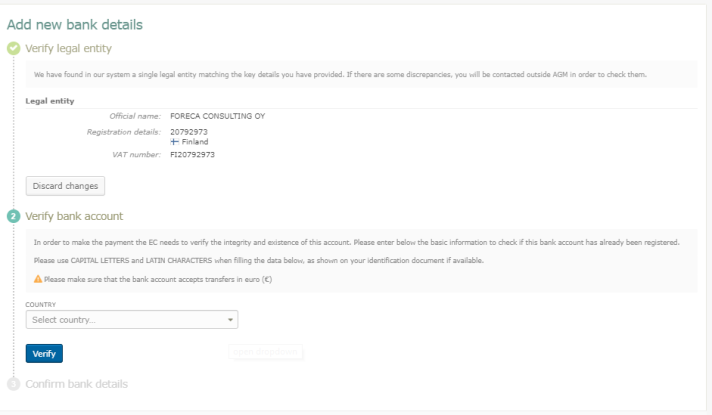
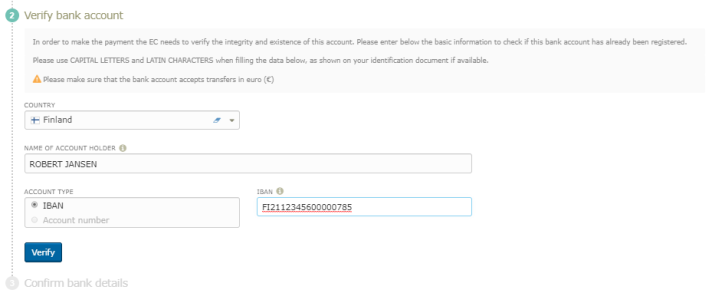
After selecting the country, fill in the name of the account holder and the account number/IBAN, then click Verify.
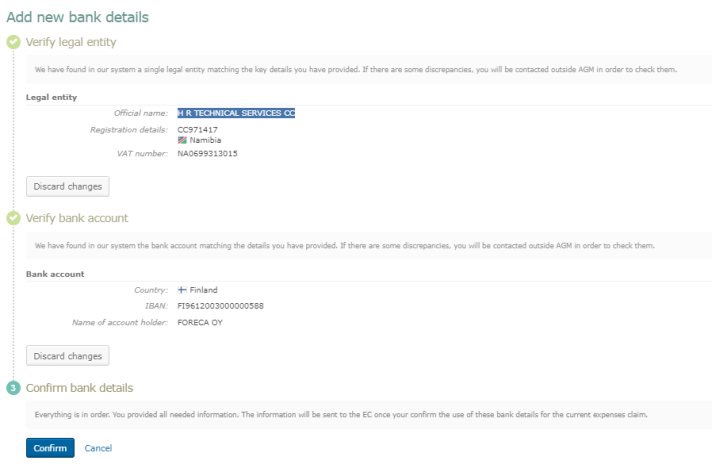
In the Confirm bank details section, click Confirm.
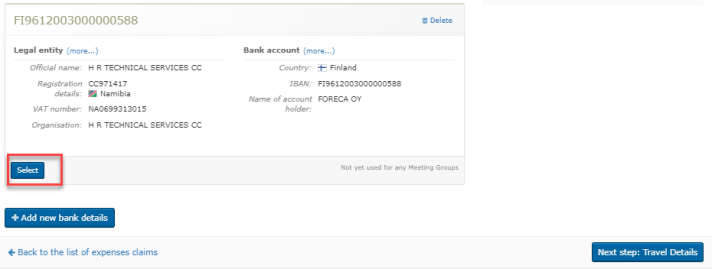
In the bank account list, click Select to select the bank account for this meeting.
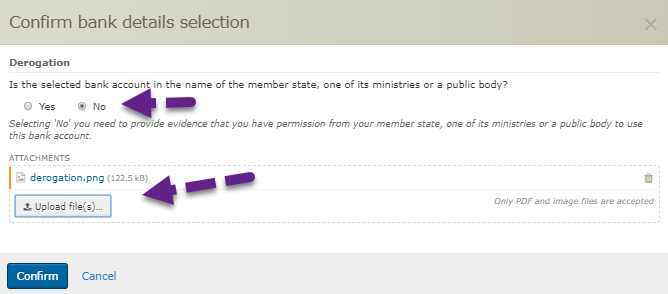
You’ll be asked whether this is a government (or public body or organisation) account. If you want to use your own private account, select No and upload the permission.
After clicking Confirm, a banner is displayed to inform you that you’ve submitted your bank account for validation.
You can’t modify the bank account while it’s being validated.
The validators can request modifications of your bank account details. You can continute with entering the Travel details, but you can only submit the claim after the bank details were validated.
Expenses - business questions
Please find the leaflet with the general reimbursement rules and guidelines to follow when preparing your journey here.
Expenses - business questions
- Travel allowance
You must use the most appropriate means of transport given the distance involved.
- Daily allowance
This covers part of your expenses (bus, tram, train, metro, taxi, parking, etc.). Check the current amount of the daily allowance here.
If the place of departure specified in the invitation is up to 100 km away, the allowance is reduced by 50%.
- Accommodation allowance
This is a lump sum covering your stay in a hotel. The number of nights may not exceed the number of meeting days + 1 (generally the night before the meeting starts and the night after the meeting ends, depending on the travel times). Check the current amount of the accommodation allowance here.
Expenses - business questions
No, you can only claim travel costs.
Expenses - business questions
You may be entitled to an allowance on the basis of a derogation note from the Commission Directorate-General that invited you.
Expenses - business questions
The daily allowance and/or accommodation allowance may be increased by 50% following a decision by the responsible authorising officer by delegation (Commission Directorate-General) for high-level experts, with a minimum of €300 when the increase applies to both the daily allowance and the accommodation allowance.
Expenses - business questions
If you are entitled to a special allowance (for your preparatory work and/or participation in the group’s activities and related external meetings, etc.), this allowance and the appropriate amount is granted on the basis of a Commission Decision.
Expenses - business questions
Contact the financial department of the EC (PMO) by filling in the Contact Us page, enclosing your supporting documents so that they can make an additional payment after checking your documents.
Expenses - business questions
You should submit your request within 30 calendar days after your attendance has been confirmed and you’ve been notified via an email from AGM.
Expenses - business questions
We apply the typical economy class fare for the route you’ve taken.
Expenses - business questions
We apply the typical economy class fare for the route specified in the letter of invitation (i.e. the return journey from the place of departure specified in the invitation to the place where the meeting is held).
Expenses - business questions
If, during the same visit, you attend consecutive meetings that are organised by different Commission Directorates-General, your expenses are reimbursed as if you undertook a single visit. Therefore, you submit expenses in the same way as you would for a single meeting/visit. You cannot be reimbursed twice for the same journey.
Expenses - business questions
You must attach all supporting documents related to your transport and accommodation expenses (documents indicating dates, prices and travel class, place of departure and arrival).
Expenses - business questions
No, you don’t need to submit your transport costs.
Expenses - business questions
You can submit your travel expenses in any currency. You’ll be reimbursed in euros.
Expenses - business questions
You’ll receive a notification as soon as the meeting has been closed by the person responsible, who will also have validated your presence at the meeting.
If you haven’t submitted your travel expenses, you’ll receive a reminder 10 and 20 days after the end of the meeting.
Once the 30 day submission deadline has passed, you’ll no longer be able to submit your reimbursement request.
Expenses - business questions
You’ll receive a notification stating that your reimbursement request has been processed.
Other expenses (non-standard)
- Insurance: Insurance is covered by the daily allowance if you’re entitled to it.
- Visa fees: These fees are reimbursed following authorisation by the officer responsible for the meeting (Commission Directorate-General that invited you).
- Vaccinations: These fees are reimbursed following authorisation by the officer responsible for the meeting (Commission Directorate-General that invited you).
Other expenses (non-standard)
If the Commission cancels the meeting, it must honour its commitments to the experts invited. You should have been informed of this cancellation and, if possible, have made arrangements to cancel your travel and accommodation.
If you’ve taken out travel insurance, ask your travel agency to reimburse your travel expenses (the airport taxes should be reimbursed at the very least).
The Commission will reimburse any remaining costs resulting from partial reimbursement or the total costs in the event of non-reimbursement in accordance with its usual procedures. You should attach email exchanges with the travel agency to the files.
Other expenses (non-standard)
If you have cancellation insurance for your trip, contact your insurance company immediately for a possible partial or full refund.
If you don’t have cancellation insurance, you must upload in AGM a solemn declaration in writing.
In any case, you must upload your medical certificate (without mentioning the illness) and all supporting documents with the amounts to be reimbursed.
In addition, the Authorising Officer of the Commission Directorate-General that invited you must authorise reimbursement via AGM by providing a note justifying the decision to reimburse your travel and/or accommodation expenses.
Other expenses (non-standard)
If you have cancellation insurance for your trip, contact your insurance company immediately for a possible partial or full refund.
If you don’t have cancellation insurance, you must upload in AGM a solemn declaration in writing.
In any case, you must upload all supporting documents with the amounts to be reimbursed.
In addition, the Authorising Officer of the Commission Directorate-General that invited you must authorise reimbursement via AGM by providing a note justifying the decision to reimburse your travel and/or accommodation expenses.
Other expenses (non-standard)
Fill in the Contact Us page and ask the PMO team for the Commission’s bank account number and bank reference number.
Other expenses (non-standard)
Your travel and/or accommodation expenses are reimbursed as well as those of the person accompanying you. The expenses of the person accompanying you will be reimbursed based on a letter from the authorising officer of the Commission Directorate-General that invited you.
Mobile access to AGM
You can check your AGM profile through a web-based mobile application called PMO Mobile. It allows you
• to view meeting details and
• to accept or decline meeting invitations.
You still need to access the AGM desktop version to activate your profile or submit expense claims.
PMO Mobile works on recent versions of Chrome on Android and Safari on iOS. PMO Mobile is available at:
It is not available in the Apple App nor Google Play stores.
The PMO Mobile App is accessible via EU-Login with double authentication method (for instance using Password and Mobile phone + SMS). More information related to EU-Login and how to add a mobile device are available at:
https://webgate.ec.europa.eu/cas/userdata/mobileApp/manageMyMobileDevice...
Mobile access to AGM
Before you can attend meetings, you must first activate your profile. This can only be done using the AGM desktop version available at: https://webgate.ec.europa.eu/tools/agm/fo
Mobile access to AGM
When receiving for the first time an invitation to a meeting, you must activate your profile on the desktop, not on PMO Mobile.The link to the desktop application is:
https://webgate.ec.europa.eu/tools/agm/fo
Once you activated your profile on the desktop, meetings to which you were invited are displayed in PMO Mobile and can be accepted or declined from the meeting details page.
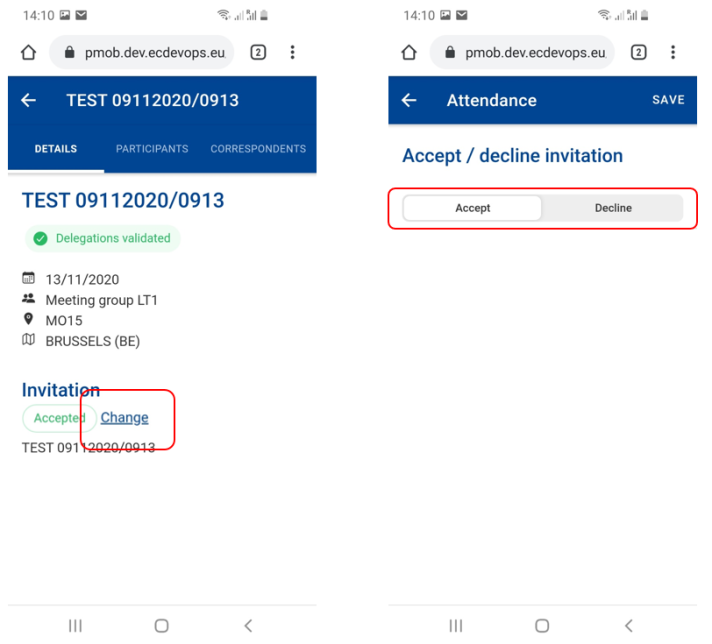
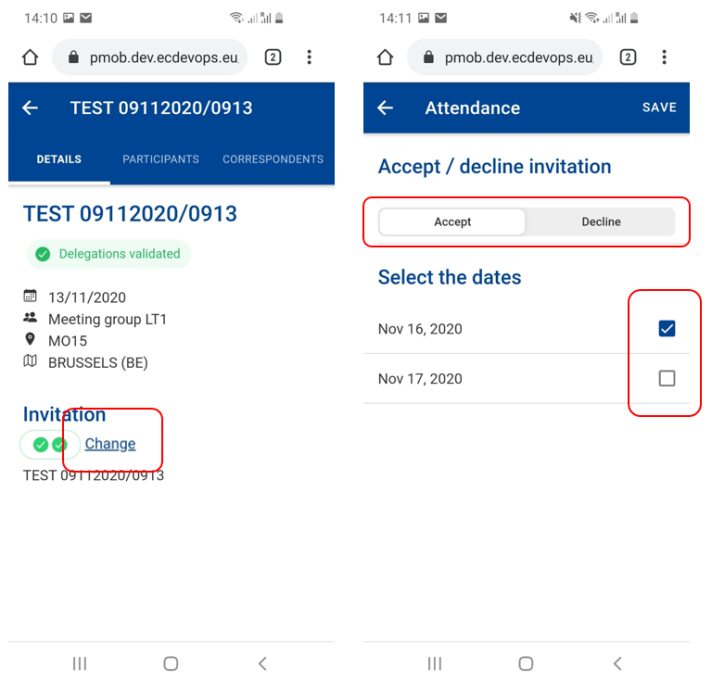
To accept/reject a meeting in PMO Mobile, follow the steps:
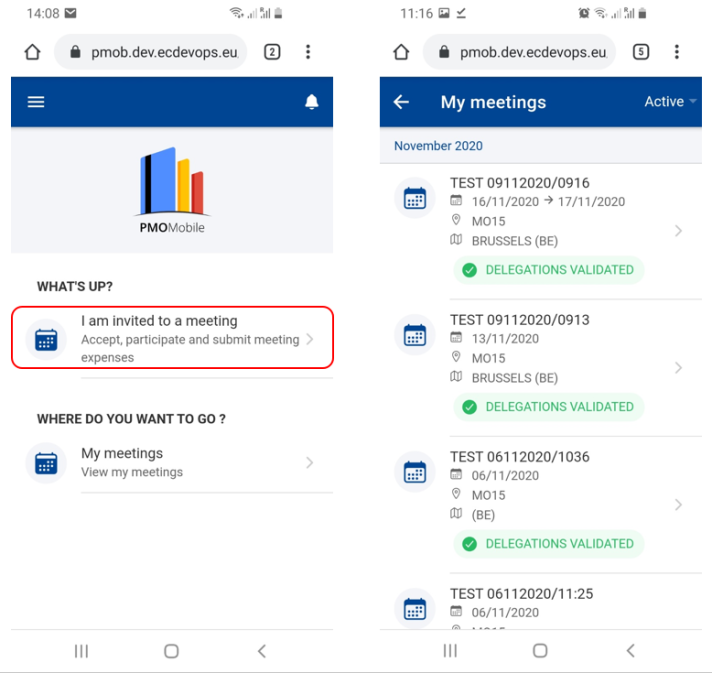
- Select My meetings from the home page.
- Select the meeting from the list of meetings in the Details tab and click on the Change link.
- The app displays the one-day or the multi-days meeting invitation
- Select accept/decline. In multi-days meetings, if you accepted the meeting, you may select the days you are going to attend.
- Press Save.
One-day meeting invitation:
Mobile access to AGM
You may view the list of meetings you have been invited to by selecting My meetings on the home page.
For each meeting, the App displays the title, start and end dates, address (venue), country and status.
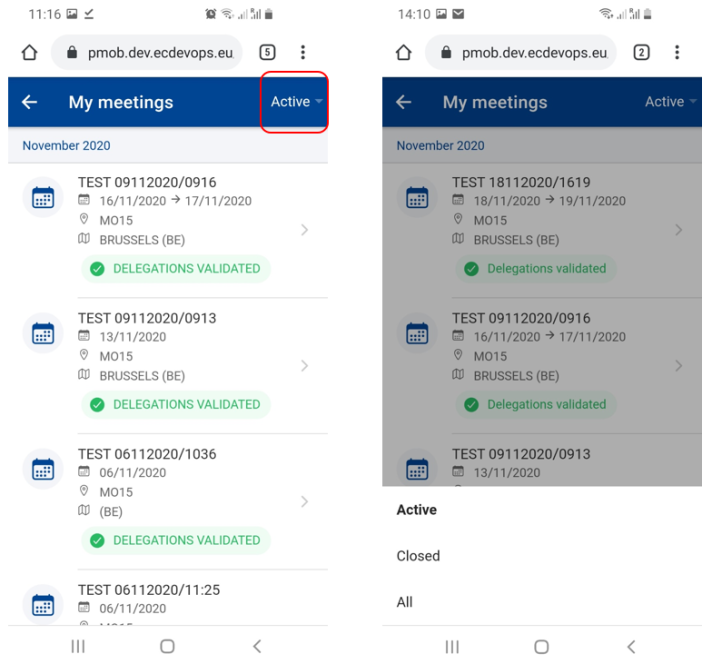
You may view all meetings or only the active or closed meetings. To do so, select the filter option as follows:
Mobile access to AGM
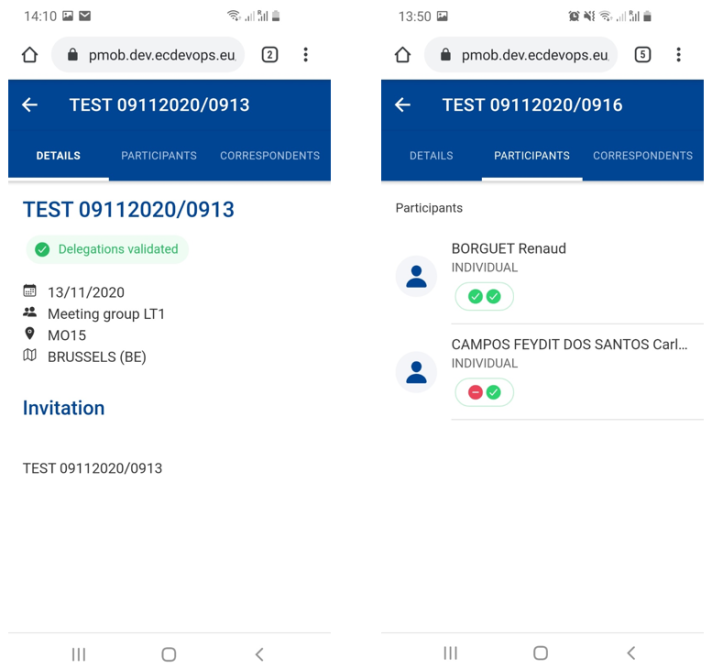
You can view the details of a meeting by selecting it from the meetings list. The PMO Mobile app displays the following details:
• the meeting’s details: its status, its title, start and end dates, address (venue) and country
• the invitation attachments, which you can view or download by clicking on the attachment
• the invitation text
• the participants list and dates for which they accepted/rejected the meeting
• the list of Correspondents and Watchers.
Mobile access to AGM
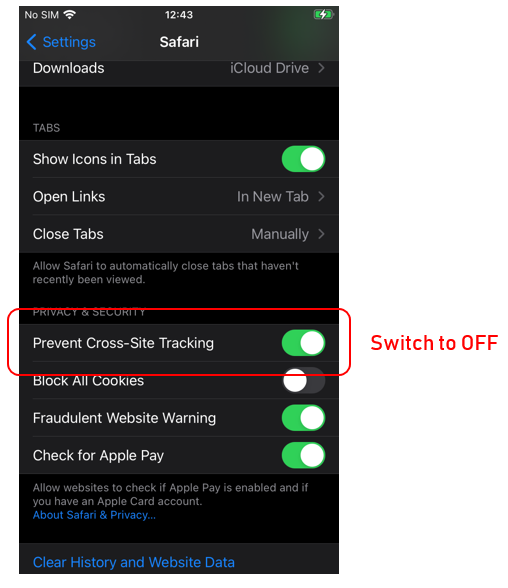
When loading PMO Mobile, iPhones upgraded to iOS version 14 may enter a loop between EU Login and PMO Mobile (screen switching back and forth between both screens). After a while, EU Login will stop and show a message like Client Failure Limit Exceeded.
Go to iPhone's settings for Safari, then scroll down to the Prevent Cross-Site Tracking option. If this is setting is set to ON (as in the screenshot below), switch it to OFF.
Mobile access to AGM
Use the web form available at: https://advanced-gateway-meetings.ec.europa.eu/contact-us_en
Mobile access to AGM
Please send an email to EC-HELPDESK-ITec [dot] europa [dot] eu (EC-HELPDESK-IT[at]ec[dot]europa[dot]eu)